
I am working on an asp.net mvc-5 web application. I have the following model class :-
public class Details4
    {
        [HiddenInput(DisplayValue=false)]
        public string RESOURCENAME { set; get; }
        [Display (Name="Account Name")]
        [Required]
        public string ACCOUNTNAME { set; get; }
        [Display(Name = "Resource type")]
        [Required]
        public string RESOURCETYPE { set; get; }
        [DataType(DataType.Password)]
        [Required]
        public string PASSWORD { set; get; }
        [Display(Name = "Description")]
        [DataType(DataType.MultilineText)]
        public string Description { set; get; }
        [Display(Name= "URL")]
        [Url]
        public string RESOURCEURL { set; get; }
        [Display(Name="Owner Name")]
        [Required]
        public string OWNERNAME { set; get; }
        [Display(Name = "Resource Group Nam")]
        public string RESOURCEGROUPNAME { set; get; }
        [JsonProperty("Domain")]
        public string DomainName { set; get; }
        [JsonProperty("DNSNAME")]
        public string DNSNAME { set; get; }
         [Display(Name = "Department")]
        public string DEPARTMENT { set; get; }
         [Display(Name = "Location")]
        public string LOCATION { set; get; }
        public List<RESOURCECUSTOMFIELD> RESOURCECUSTOMFIELD { set; get; }
    }

 public class RESOURCECUSTOMFIELD
    {
        public string CUSTOMLABEL { set; get; }
        public string CUSTOMVALUE { set; get; }
    }
now i usually use @Html.EditorFor() & LabelFor() at the field level. but for this model i wanted to start using @Html.EditorForModel as i will have less markup on the view:-
@Html.EditorForModel()
now the result of this was not 100% what i was expecting:-
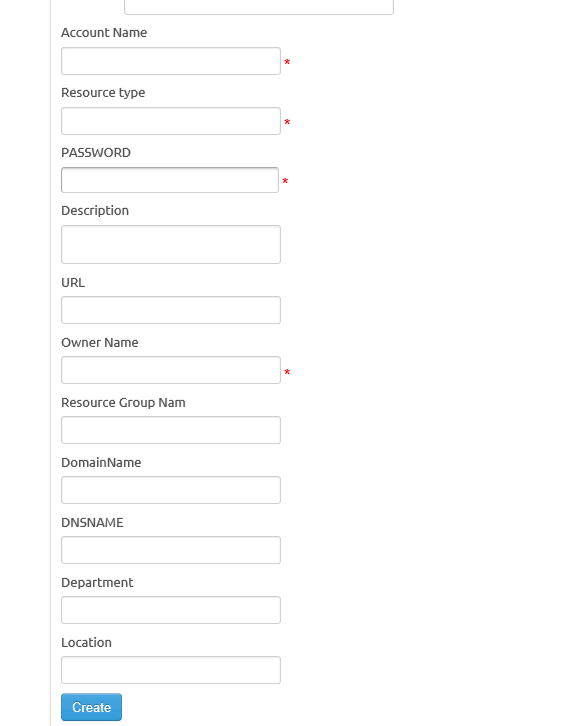
so can any one advice how i can overcome these limitations:-
- Is there a way to have the ResourceType field as a drodownlist ? . now if i am rendering separate fields i can use
@Html.DropDownlistFor.. but not sure how i can handle this when using@Html.EditorForModel? - is there a way to modify the generated layout ?,, now usual all over my application i have the following layout for the label –> text box:-
<div> <span class="f">@Html.DisplayNameFor(model => model.Resource.RESOURCENAME)</span> @Html.EditorFor(model => model.Resource.RESOURCENAME) @Html.ValidationMessageFor(model => model.Resource.RESOURCENAME) </div>
where i have the label & text at the same line, and i wrap the label with a class=f which will show the label in bold font. so can i modify the generated output from the EditorForModel to have the label and the text box at the same line, instead of being on 2 separate lines?
- will i be able to force the EditorForModel to render the
RESOURCECUSTOMFIELDlist columns ?